最近になって、
reveal-ck という、
Markdown でカッコいいスライドが作れるツールを知った。
GitHub - jedcn/reveal-ck: Create slides with markdown
https://github.com/jedcn/reveal-ck
reveal-ck は
reveal.js のスライドを簡単に作れるようにしたものらしい。
reveal.js のデモ
reveal.js – The HTML Presentation Framework
http://lab.hakim.se/reveal-js/
ということで早速環境を作ってスライドを作ってみようと思う。
準備するもの
- Ruby 2.4
- 以下からダウンロード
RubyInstaller for Windows - Downloads
https://rubyinstaller.org/downloads/
Ruby インストール
Ruby・MSYS
Ruby のインストーラを起動し、Ruby をインストール。
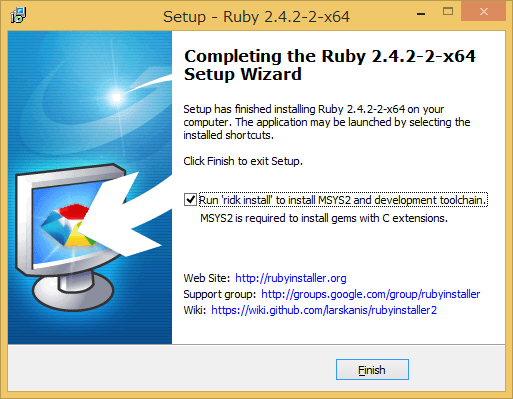
インストーラの最後の画面で ridk で MSYS インストールするか みたいなチェックボックスが出てくるのでチェックがついていることを確認して
Finish
 _____       _           _____           _        _ _         ___
|  __ \     | |         |_   _|         | |      | | |       |__ \
| |__) |   _| |__  _   _  | |  _ __  ___| |_ __ _| | | ___ _ __ ) |
|  _  / | | | '_ \| | | | | | | '_ \/ __| __/ _` | | |/ _ \ '__/ /
| | \ \ |_| | |_) | |_| |_| |_| | | \__ \ || (_| | | |  __/ | / /_
|_|  \_\__,_|_.__/ \__, |_____|_| |_|___/\__\__,_|_|_|\___|_||____|
                    __/ |           _
                   |___/          _|_ _  __   | | o __  _| _     _
                                   | (_) |    |^| | | |(_|(_)\^/_>

   1 - MSYS2 base installation
   2 - MSYS2 system update
   3 - MSYS2 and MINGW development toolchain

Which components shall be installed? If unsure press ENTER [1,2,3]
と表示されるので、1 → 2 → 3 の順で実行
うっかり画面を閉じてしまったりした場合は
> C:\Ruby24-x64\bin\ridk install
のような感じで ridk を起動すれば良い。
Ruby 環境設定
gem のドキュメントをインストールしたくない場合は以下のファイルを作成。
(私は今まで必要になったことはないです)
%USERPROFILE%\.gemrc
install: --no-document
update: --no-document
MSYS 環境設定
MSYS で Ruby に PATH を通すため以下を設定
C:\msys64\home\<ユーザ名>\.bash_profile
PATH="/c/Ruby24-x64/bin:${PATH}"
reveal-ck インストール
MSYS を実行し、一応 .bash_profile 再読み込み。
$ source ~/.bash_profile
reveal-ck インストール
$ gem install reveal-ck
依存関係を解決しながらズラズラとインストールされます。
試す
さっそく reveal-ck を試します
インストールディレクトリで slides.md を作成
## Hello World!
:smile:

***

### vertical 1

---

### vertical 2

***

### horizontal 1

---

### horizontal 2
以下のコマンドで generate してスライドのデータを作成します
$ reveal-ck generate
以下のコマンドで、slides.md の変更を監視し、ライブリロード(リアルタイムでブラウザで表示)させることができます。
$ reveal-ck serve
面倒なので以下のようなバッチを作っておくと楽
set PATH=C:\Ruby24-x64\bin;%PATH%
reveal-ck generate
set PATH=C:\Ruby24-x64\bin;%PATH%
"%PROGRAMFILES(X86)%\Google\Chrome\Application\chrome.exe" http://localhost:10000
reveal-ck serve
トラブル
reveal-ck serve でエラーが表示される
こんなエラー
[ reveal-ck ] Getting Ready to Reload Browsers.
[ reveal-ck ] Getting Ready to Rebuild Slides.
  Please add the following to your Gemfile to avoid polling for changes:
    gem 'wdm', '>= 0.1.0' if Gem.win_platform?
[ reveal-ck ] Starting Webserver.
Unable to load the EventMachine C extension; To use the pure-ruby reactor, require 'em/pure_ruby'
Unable to load the EventMachine C extension; To use the pure-ruby reactor, require 'em/pure_ruby'
[   reload  ] Run 'gem install win32console' to use color on Windows
[   reload  ] Could not load 'guard/livereload' or find class Guard::Livereload
[   reload  ] Error is: cannot load such file -- 2.4/rubyeventmachine
[   reload  ] C:/Ruby24-x64/lib/ruby/2.4.0/rubygems/core_ext/kernel_require.rb:55:in `require'
> [#] C:/Ruby24-x64/lib/ruby/2.4.0/rubygems/core_ext/kernel_require.rb:55:in `require'
見た感じ、いくつか gem が足りてなさそう。
wdm と eventmachine を入れる
$ gem install wdm eventmachine
再実行
[ reveal-ck ] Starting Webserver.
Unable to load the EventMachine C extension; To use the pure-ruby reactor, require 'em/pure_ruby'
Unable to load the EventMachine C extension; To use the pure-ruby reactor, require 'em/pure_ruby'
[   reload  ] Run 'gem install win32console' to use color on Windows
[   reload  ] Could not load 'guard/livereload' or find class Guard::Livereload
[   reload  ] Error is: cannot load such file -- 2.4/rubyeventmachine
[   reload  ] C:/Ruby24-x64/lib/ruby/2.4.0/rubygems/core_ext/kernel_require.rb:55:in `require'
> [#] C:/Ruby24-x64/lib/ruby/2.4.0/rubygems/core_ext/kernel_require.rb:55:in `require'
またエラー
win32console が足りないらしい。
Could not load 'guard/livereload' or find class Guard::Livereload は eventmachine が 1.0.9.1 より新しいバージョンを使用すると発生するらしい。
$ gem install win32console
$ gem install eventmachine --version 1.0.9.1
$ gem uninstall eventmachine

Select gem to uninstall:
 1. eventmachine-1.0.9.1
 2. eventmachine-1.2.5-x64-mingw32
 3. All versions
> 2
Successfully uninstalled eventmachine-1.2.5-x64-mingw32
無事エラーが出なくなりました。
Gemfile つくるなら
source "https://rubygems.org"

gem 'wdm'
gem 'eventmachine', '1.0.9.1'
gem 'reveal-ck'
gem 'win32console'
みたいなの作って
bundle install してもいい
スライドが1ページしか作られない
slides.md の改行コードが CRLF だとスライドが正常に作られません
LF で保存しなおすと、ちゃんと生成されるはず