ようへい
ラベル Eclipse の投稿を表示しています。 すべての投稿を表示

2014年2月26日水曜日

自分なりの Android 開発環境まとめ (2014/02/26版)

久しぶりにAndroidアプリの開発をしようと思い、イチから開発環境の構築をしたのでメモ。
なお、以下の情報はIntel製CPUを積んだPCでの環境構築を前提としている。

環境構築準備

以下のファイルを準備する。
Eclipse 最新版
Pleiades - Eclipse プラグイン日本語化プラグイン | MergeDoc Project
Android SDK Tools
Android SDK | Android Developers
DOWNLOAD FOR OTHER PLATFORMSをクリックし、SDK Tools OnlyRecommendedとなっているインストーラーをダウンロード
Java Development Kit (JDK) 6
Java Archive Downloads - Java SE 6
からJDK 6 をダウンロード。
ダウンロードにはOracleへの登録が必要。
JDK 1.7 は公式にはサポートされていないので、公式でサポートされているJDK 1.6 を使用する。
ダウンロード後、それぞれインストールしておく。

公式IDEの Android Studio はまだ成熟してる感じじゃないので今回はパス。

Android SDK Tools での環境設定

開発対象とするバージョンのSDK PlatformIntel x86 Atom System ImageGoogle APIsに加え、ExtrasAndroid Support LibraryGoogle USB DriverIntel x86 Emulator Acceletor (HAXM)をインストールする。
Intel x86 Emulator Acceletor (HAXM) のみマニュアルでのインストールが必要なので注意。
Android SDK Toolsインストールディレクトリ配下の、extras\intel\Hardware_Accelerated_Execution_ManagerIntelHaxm.exeがあるので、インストールする。
その後、Android Virtual Device Manager(AVD)を起動し、エミュレートするデバイスを作る。
Intel製CPUで快適にエミュレートされるよう、デバイス作成時、以下を設定する。
CPU/ABI
Intel Atom (x86)を選択
Emulation Options
Use Host GPUをチェック

Eclipse での環境設定

JStyle アンインストール
便利な反面、coreがアップデートした時にマニュアルアップデートが必要だったり面倒なのでアンインストールしておく。
これは好みで。
plugins ディレクトリーの以下 jar ファイルを削除。
  • jp.sourceforge.mergedoc.jstyle_x.x.x.x.jar
  • org.eclipse.swt.win32.win32.x86_xxx.xxx.jar
  • org.eclipse.swt.win32.win32.x86_source_xxx.xxx.jar
その後、オリジナルの jar をリネーム。
  • org.eclipse.swt.win32.win32.x86_64_xxx.xxx.jar.backup
    -> org.eclipse.swt.win32.win32.x86_64_xxx.xxx.jar
  • org.eclipse.swt.win32.win32.x86_64_source_xxx.xxx.jar.backup
    -> org.eclipse.swt.win32.win32.x86_64_source_xxx.xxx.jar
一旦Eclipseを-cleanで起動しなおす。
Plugin インストール
ウィンドウ»設定を開き、インストール/更新»使用可能なソフトウェア・サイトで以下を追加する。
ADT
https://dl-ssl.google.com/android/eclipse/
Andrey Loskutov
http://andrei.gmxhome.de/Eclipse/
その後、ヘルプ»新規ソフトウェアのインストールで、以下をインストール。
http://andrei.gmxhome.de/Eclipse/
  • AnyEditTools
https://dl-ssl.google.com/android/eclipse/
  • Android DDMS
  • Android 開発ツール
  • Android 階層ビュアー
  • Android トレースビュー
一旦Eclipseを-cleanで起動しなおす。
設定変更
ウィンドウ»設定を開き、一般»エディター»テキスト・エディター行番号の表示にチェック。
Java»インストール済みのJRE検索を押してJDK 1.6 を検索しチェックしておく。
Java»コンパイラーコンパイラー準拠レベル1.6にしておく。
こんなところです。
構築後に思い出しながら書いているので、忘れてる部分もあるかも。
関連記事

2013年2月19日火曜日

[GAE/J] Google App Engine Java SDK 1.7.5 がリリースされました

Google App Engine Java SDK 1.7.5 がリリースされました。 リリースノートは以下。
  • New instance classes F4_1G and B4_1G are now available. These instances have compute capacity equal to F4/B4 but with a maximum of 1G RAM instead of 512MB.
  • The DataNucleus plugin has been upgraded to 2.1.2.
  • The deprecated classes AddException, AddResponse, ListException, ListIndexesException, ListIndexesRequest, ListIndexesResponse, ListRequest, ListResponse, and RemoveException were removed from the Search API in the SDK. If your app references any of these classes, you must deploy a new version without these references before the next release of App Engine. If you do not do this, your app may stop working in production.
  • The Conversion API, which was decommissioned last release, has been removed from the SDK. In a future release, the API will be removed from the runtime and applications that attempt to use it may stop working. Applications in production that import the library should be fixed as soon as possible.
  • We are making Java 7 available as an experimental feature. We strongly encourage local and production testing for all existing applications. For more information, please visit: http://developers.google.com/appengine/docs/java/java7
  • The Channel API now has the ability to send channel messages from any app version or backend regardless of where the channel was created.
  • The URL Fetch service now supports PATCH method requests.
  • The Mail API can now send mail bounce notifications to the app. The notification will be delivered to /_ah/bounce if mail_bounce inbound services are enabled.
  • The Blobstore service now returns the created filename instead of the blobKey when using Cloud Storage
  • Fixed an issue with Datastore callback annotations not working when running locally on Windows.
SdkForJavaReleaseNotes - googleappengine - Google App Engine Java SDK Release Notes - Google App Engine - Google Project Hosting
http://code.google.com/p/googleappengine/wiki/SdkForJavaReleaseNotes
実験的ではあるようですが、Java 7ランタイムがサポートされたようです。
試しに、Javaコンパイラーの準拠レベルを1.7にしてdeployしてみましたが、問題なく動いているようです。
Java 7ランタイムを有効にすると、deploy時にコンソールにUsing java7 runtime: trueと出力されました。
Java 7 Considerations - Google App Engine — Google Developers
https://developers.google.com/appengine/docs/java/java7
関連記事

2012年12月14日金曜日

[GAE/J] Google App Engine Java SDK 1.7.4 がリリースされました

Google App Engine Java SDK 1.7.4 がリリースされました。
リリースノートは以下。
  • Traffic Splitting is now a GA feature.
  • Task Queue Statistics is now a GA feature.
  • Logs API now has the ability to fetch requests based on a list of request_ids. Currently, this only works in production and is not supported in dev_appserver.
  • The SDK now includes an IDE-friendly zip with the source for the App Engine APIs. The zip resides in <SDK_ROOT>/src/user
  • Additional support for Maven now exists through both Maven archetypes and a Maven plugin. Documentation for the new Maven support can be found at https://developers.google.com/appengine/docs/java/tools/maven
  • DISTINCT for Datastore queries is now available as an experimental feature.
  • The decommissioned Conversion API has been removed.
  • Various JSP improvements
    • JSPs are now compiled together as opposed to one by one. This improves the compilation process time.
    • JSP compiled classes are packaged in JAR files.
    • You can now avoid the upload of JSP source, which is typically not needed at runtime. This can be done via the new --delete_jsps option in the appcfg tool. By default, this option is not set.
    • You can now package all the WEB-INF/classes/* classes into jar files. This can be done via the new --enable_jar_classes option in the appcfg tools. By default, this option is not set.
  • Users can now set how many columns can be viewed in the Datastore Viewer via a drop-down menu which customizes the number of columns displayed.
  • Fixed an issue with BackendService.getCurrentInstance() returning thread ID instead of integer instance ID in production.
  • Fixed an issue with Datastore Backup failing when a schema has a very large number of properties.
  • Fixed an issue with users being unable to change Authentication Type after app creation in the Admin Console.
SdkForJavaReleaseNotes - googleappengine - Google App Engine Java SDK Release Notes - Google App Engine - Google Project Hosting
http://code.google.com/p/googleappengine/wiki/SdkForJavaReleaseNotes
今回のリリースでは、Traffic Splittingのサポート、Task Queueの統計機能の追加、Datastore Viewerでの表示カラム数を指定できる機能の追加などが行われています。
また、JSPに関するコンパイル時間短縮等の幾つかの修正や、廃止となったConversion APIが削除されているようです。
関連記事

2012年10月24日水曜日

[GAE/J] Google App Engine Java SDK 1.7.3 がリリースされました

Google App Engine Java SDK 1.7.3がリリースされました。
リリースノートは以下。
  • We encourage you to try and test your application using Java 7 and the App Engine SDK. Note that Java 7 is not a supported runtime.
  • Java 7 Features that we encourage you to try in dev appserver:
    • Strings in switch
    • Binary integral literals and underscores in number literals
    • Multi-catch and more precise rethrow
    • Improved type inference for generic instance creation (diamond)
    • try-with-resources statement
    • Simplified varargs method invocation
  • Java 7 features that are NOT supported:
    • All new Java 7 classes (the Google App Engine whitelist has not been updated yet)
    • Method Handles
    • Invoke Dynamic bytecode
  • InetAddress name resolution now displays UnknownHostException instead of a runtime exception error when the host is unknown.
  • Datastore Index stats now report type instead of representation-type.
  • Class Loading Priority can now be granted to specific JAR files by adding class-loader-config element in appengine-web.xml file. This is an experimental feature.
  • Queries with transactions are now fully checked for consistency in Remote API.
  • Global Consistent Indexes are now deprecated in the Search API.
  • ListResponse<Document> listDocuments(ListRequest) has been deprecated and replaced with GetResponse<Document> getRange(GetRequest) in the Search API.
  • ListIndexesReponse listIndexes(ListIndexesRequest) has been deprecated and replaced with GetResponse<Index> getIndexes(GetIndexesRequest) in the Search API.
  • getField(String) has been deprecated and aliased to getFields(String) in the Search API.
  • AddResponse Index.add() has been deprecated and renamed to PutResponse Index.put() in the Search API.
  • RemoveResponse Index.remove() has been deprecated and renamed to DeleteReponse Index.delete() in the Search API.
  • Users can now change authentication options after app creation
  • Fixed an issue with Channel API breaking when using urlfetch service. This issue was limited to the SDK.
  • Fixed an issue with ResponseRewriterFilter not being threadsafe when using Remote API.
SdkForJavaReleaseNotes - googleappengine - Google App Engine Java SDK Release Notes - Google App Engine - Google Project Hosting
http://code.google.com/p/googleappengine/wiki/SdkForJavaReleaseNotes
Java 7に関するアップデートのようです。
Java 7からサポートされているランタイムは未サポートとのことなので、Java 7にするのはもう少し待ったほうが良いのかなぁ。
関連記事

2012年9月26日水曜日

[Eclipse] PhoneGap で Android アプリ開発

面白そうな記事を見つけたので、早速試してみる。
なんでもHTML、JavaScript、CSSでAndroidアプリが作れるそうだ。
Adobeいつのまにこんなフレームワーク作ってたんだ・・・
Eclipse×PhoneGapでAndroidアプリ開発! ~インストールからアプリ実行まで (1/3):CodeZine
http://codezine.jp/article/detail/6687
Apache Cordova API Documentation
http://docs.phonegap.com/en/2.1.0/guide_getting-started_android_index.md.html#Getting Started with Android

PhoneGapの準備

以下のページからPhoneGapをダウンロード。
PhoneGap | Download & Archives
http://www.phonegap.com/download 現時点で最新の 2.1.0 をダウンロードしました。
ダウンロード後、解凍しておきます。

プロジェクトの作成

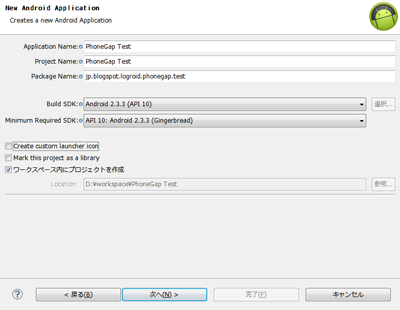
Androidプロジェクトを新規に作ります。
PhoneGap で Android アプリ開発
ここでは、2.3.3をターゲットとしてプロジェクトを作りました。
テストプロジェクトなのでCreate custom launcher iconのチェックは外します。
PhoneGap で Android アプリ開発
BlankActivityを作成します。
PhoneGap で Android アプリ開発
後は適当に。

PhoneGapインストール

PhoneGap で Android アプリ開発
プロジェクトのassetsディレクトリ内にwwwフォルダを作成します。
また、libsフォルダが無い場合は新規に作成します。
PhoneGap で Android アプリ開発
PhoneGapのlib/android/cordova-2.1.0.jsassets/wwwディレクトリにコピーします。
lib/android/cordova-2.1.0.jarlibsディレクトリにコピーします。
lib/android/xmlディレクトリをresディレクトリにコピーします。
libs配下に追加したcordova-2.1.0.jarをビルドパスに追加するため、libs/cordova-2.1.0.jarを右クリックし、ビルド・パス->ビルド・パスに追加を行います。

アプリの作成

PhoneGap で Android アプリ開発
index.htmlをwwwディレクトリ配下に作成。
Webサイトと同じように、このファイルがアプリのトップ画面になるようだ。
index.htmlに書くコードは以下。
<!DOCTYPE HTML>
<html>
  <head>
    <title>PhoneGap</title>
    <script type="text/javascript" charset="utf8" src="cordova-2.1.0.js"></script>
  </head>
  <body>
    <h1>Hello PhoneGap</h1>
  </body>
</html>
Activityファイルを開き、以下のように変更します。
package jp.blogspot.logroid.phonegap.test;

import org.apache.cordova.DroidGap;

import android.os.Bundle;

public class MainActivity extends DroidGap {

    @Override
    public void onCreate(Bundle savedInstanceState) {
        super.onCreate(savedInstanceState);
 super.loadUrl("file:///android_asset/www/index.html");
    }

}

メタデータ修正

AndroidManifest.xmlファイルを開き、以下のように変更します。
<manifest xmlns:android="http://schemas.android.com/apk/res/android"
    package="jp.blogspot.logroid.phonegap.test"
    android:versionCode="1"
    android:versionName="1.0" >

    <uses-sdk
        android:minSdkVersion="10"
        android:targetSdkVersion="15" />

    <supports-screens
        android:anyDensity="true"
        android:largeScreens="true"
        android:normalScreens="true"
        android:resizeable="true"
        android:smallScreens="true" />

    <uses-permission android:name="android.permission.ACCESS_COARSE_LOCATION" />
    <uses-permission android:name="android.permission.ACCESS_FINE_LOCATION" />
    <uses-permission android:name="android.permission.ACCESS_LOCATION_EXTRA_COMMANDS" />
    <uses-permission android:name="android.permission.ACCESS_NETWORK_STATE" />
    <uses-permission android:name="android.permission.BROADCAST_STICKY" />
    <uses-permission android:name="android.permission.CAMERA" />
    <uses-permission android:name="android.permission.GET_ACCOUNTS" />
    <uses-permission android:name="android.permission.INTERNET" />
    <uses-permission android:name="android.permission.MODIFY_AUDIO_SETTINGS" />
    <uses-permission android:name="android.permission.READ_CONTACTS" />
    <uses-permission android:name="android.permission.READ_PHONE_STATE" />
    <uses-permission android:name="android.permission.RECEIVE_SMS" />
    <uses-permission android:name="android.permission.RECORD_AUDIO" />
    <uses-permission android:name="android.permission.VIBRATE" />
    <uses-permission android:name="android.permission.WRITE_CONTACTS" />
    <uses-permission android:name="android.permission.WRITE_EXTERNAL_STORAGE" />

    <application
        android:icon="@drawable/ic_launcher"
        android:label="@string/app_name"
        android:theme="@style/AppTheme" >
        <activity
            android:name=".MainActivity"
            configChanges="orientation|keyboardHidden"
            android:label="@string/title_activity_main" >
            <intent-filter>
                <action android:name="android.intent.action.MAIN" />

                <category android:name="android.intent.category.LAUNCHER" />
            </intent-filter>
        </activity>
    </application>

</manifest>

実行

PhoneGap で Android アプリ開発
なかなか簡単に実行までできました。
本格的にJavaScript、CSS使ったアプリも作ってみたいと思います。
関連記事

2012年9月20日木曜日

[GAE/J] Google App Engine Java SDK 1.7.2 がリリースされました

Google App Engine Java SDK 1.7.2がリリースされました。
リリースノートは以下。
SdkForJavaReleaseNotes - googleappengine - Google App Engine Java SDK Release Notes - Google App Engine - Google Project Hosting
http://code.google.com/p/googleappengine/wiki/SdkForJavaReleaseNotes
課金方法の変更や、Conversion APIの廃止(に伴う警告表示)、タスクキューの統計情報、その他バグ修正、仕様変更が主な内容です。
また、1.7.3以降でDatastoreの型名が変更になるようです。
eclipseにも更新が落ちてきたので、更新してみました。
特に問題は出ていません。
関連記事

2012年8月23日木曜日

[GAE/J] Google App Engine Java SDK 1.7.1 がリリースされました

Google App Engine Java SDK 1.7.1がリリースされました。
リリースノートは以下。
You can download the latest version of the SDK here

App Engine SDK - Release Notes
Version 1.7.1 - August 21, 2012

 The URLFetch API now supports multiple cookie headers.
 http://code.google.com/p/googleappengine/issues/detail?id=3379 
 You can download 90 days worth of Usage Reports for your application from the Billing History page of the Admin Console.
 Task Queue requests now include an X-AppEngine-TaskExecutionCount that counts the number of times a task was run by an instance.
 Added support for multiple files to be deleted using the Files API.
 Added support to delete files from Google Cloud Storage using the Files API.
 Added a REQUEST_LOG_ID to be written in the logs and as an environment variable. This can be used to later identifying that request in the application logs.
 The Memcache Viewer now supports namespaces.
 http://code.google.com/p/googleappengine/issues/detail?id=7245 
 The Mail API now supports the following headers for outgoing mail: List-Id, List-Unsubscribe, On-Behalf-Of, Resent-Date, Resent-From, Resent-To.
 http://code.google.com/p/googleappengine/issues/detail?id=2559
 http://code.google.com/p/googleappengine/issues/detail?id=7672 
 PyCrypto 2.6. is now supported in the Python 2.7 runtime.
 http://code.google.com/p/googleappengine/issues/detail?id=7884 
 NDB now throws a BadProjectionError when trying to perform a projection query on an unknown or unindexed property.
 NDB Tasklets use the namespace from when it was called, not the namespace from when it is performed.
 http://code.google.com/p/appengine-ndb-experiment/issues/detail?id=190 
 NDB Properties' string representation size is limited to the max string length for Blob and Text properties.
 Appstats provides an interactive shell for observing RPC behavior of calls immediately.
 Appstats now contains information about the cost of the RPCs made during the request.
 The Images API now supports specifying the default pixel color to fill in for image types that don't support transparent images, such as JPEG.
 We've added full asynchronous API support in the Images API.
 Added an error to the Images API to indicate when a blob being referenced is not found or not accessible.
 Made the Python search limits public in the Search API.
 Added namespace support for the Search API in the Python SDK.
 http://code.google.com/p/googleappengine/issues/detail?id=7670 
 Added support in the Search API for simple sorting in the SDK.
 http://code.google.com/p/googleappengine/issues/detail?id=7456 
 The Testbed testing framework now supports the Logservice API.
 Added support in the Files API to list Google Cloud Storage files.
 Improve the MapReduce File API Reader to support multiple files and file formats.
 Fixed an issue with the App Engine satisfaction survey in the Admin Console which was released in 1.6.6, which will be re-enabled in this release.
 Fixed an issue with Search API websafe cursors not being returned as a websafe value.
 Fixed an issue where SearchRequest was returning errors that weren't available as search.Error subclasses.
 Fixed an NDB issue where entities over 1000000 bytes where written to memcache, causing failure.
 http://code.google.com/p/appengine-ndb-experiment/issues/detail?id=193 
 Fixed NDB AutoBatcher error handling.
 http://code.google.com/p/appengine-ndb-experiment/issues/detail?id=196 
 Fixed an issue where Appstats assuming all objects have a class attribute resulted in an error.
 http://code.google.com/p/googleappengine/issues/detail?id=5668 
 Fixed an issue where there was unbalanced string quoting in Appstats formatting.
 http://code.google.com/p/googleappengine/issues/detail?id=5976 
 Fixed an issue where search indexes were not persisted in the SDK.
 http://code.google.com/p/googleappengine/issues/detail?id=6791 
 Fixed an issue where an error in formatter.py in Appstats was being thrown.
 http://code.google.com/p/googleappengine/issues/detail?id=7034 
 Fixed an issue in the SDK where the Search API did not support boolean queries on a field.
 http://code.google.com/p/googleappengine/issues/detail?id=7247 
 Fixed an issue where numeric and date comparators were not supported in the Search API in the Python SDK.
 http://code.google.com/p/googleappengine/issues/detail?id=7247 
 Fixed an issue where Appstats didn't show a detailed view of an RPC when using the Python 2.7 runtime.
 http://code.google.com/p/googleappengine/issues/detail?id=7558 
 Fixed a search issue where snippets failed to highlight when a capital letter is used in a search term.
 http://code.google.com/p/googleappengine/issues/detail?id=7665 
 Fixed an issue where the SDK Admin tool couldn't browse search indexes containing unicode characters.
 http://code.google.com/p/googleappengine/issues/detail?id=7791 
 Fixed an issue where traffic splitting by cookie was not working.
 http://code.google.com/p/googleappengine/issues/detail?id=7813 
 Fixed an issue where RequestTooLargeError was being incorrectly thrown using Python 2.7.
 http://code.google.com/p/googleappengine/issues/detail?id=7820 
 Fixed a memcache race condition.
 http://code.google.com/p/googleappengine/issues/detail?id=7864 
 Fixed a Search issue in the SDK where a query that does not match all search terms resulted in divide-by-zero.
 http://code.google.com/p/googleappengine/issues/detail?id=7943
SdkReleaseNotes - googleappengine - Google App Engine Python SDK Release Notes - Google App Engine - Google Project Hosting
http://code.google.com/p/googleappengine/wiki/SdkReleaseNotes
Eclipseの更新サイトにはまだアップされていないようです。
関連記事

2012年7月3日火曜日

[Pleiades] Eclipse 4.2 Juno Windows 32bit 日本語化手順

ここでは、プラグインの管理面から、Pleiadesに同梱されているreadme.txtの方法ではなく、dropinsフォルダにインストールする方法を紹介します。

準備

ダウンロード
以下のファイルをダウンロードする
Eclipse 4.2
Eclipse Downloads
http://www.eclipse.org/downloads/
Eclipse Classic 4.2からダウンロード
Pleiades
Eclipse 日本語化 | MergeDoc Project
http://mergedoc.sourceforge.jp/index.html#pleiades.html
Pleiades 本体ダウンロードからダウンロード
解凍
ダウンロード後、ドライブの直下(C:\等)に上記のファイルを解凍する。
解凍時の注意点は、Pleiades配布ページ等を参照。
Eclipseの配置
Program Files等に、eclipseフォルダを移動する。
この辺は好みで。
パスにマルチバイト文字を含んだりすると悪影響があるかもしれません。

日本語化

Pleiadesインストール
eclipseフォルダ配下のdropinsフォルダ配下に、MergeDoc/eclipseというパスを作成し、pleiadesフォルダ配下のfeaturespluginsをコピーします。
ディレクトリ構成はこんな感じ
eclipse
└─dropins
    └─MergeDoc
        └─eclipse
            ├─features
            │  └─jp.sourceforge.mergedoc.pleiades
            │      └─META-INF
            └─plugins
                └─jp.sourceforge.mergedoc.pleiades
                    ├─conf
                    │  ├─additions
                    │  └─props
                    ├─lib
                    │  ├─apache
                    │  └─javassist
                    └─META-INF
eclipse.exe -clean.cmdもeclipseフォルダ配下へコピーしておきます。
設定
eclipse.iniを開き、以下の行を最終行に追加する。
-javaagent:dropins/MergeDoc/eclipse/plugins/jp.sourceforge.mergedoc.pleiades/pleiades.jar

完了

eclipse.exe を起動すると、Eclipseが日本語化されて起動します。

フォント変更

ここからはお好みで。
デフォルトのままだと、英数字と日本語文字のバランスが取れていないので、フォントを変更する。
  1. ウィンドウ設定で設定画面を開く。
  2. ツリーから、一般外観色とフォントでフォントを変更する。
私はメイリオをモノスペースに変換したMeiryoKe_Consoleを指定しました。
参考:プラグイン対応状況
私の以下の常用プラグインが4.2に対応しているか調べました。

オススメ プラグイン for Eclipse 3.7 - ログろいど
プラグイン名 対応状況 備考
JStyle × 未対応
64bit版のみ対応
AnyEdit 4.2は公式には未対応。
3.8向けのプラグインで動作を確認。
Google Plugin for Eclipse http://dl.google.com/eclipse/plugin/4.2
Android Developer Tools http://dl.google.com/eclipse/plugin/4.2
Google App Engine Java SDK http://dl.google.com/eclipse/plugin/4.2
JStyle以外は対応していました。
ただし、JStyleも近々対応するようですので、気長に待ちましょう。
直近は時間がとれませんが
JStyle 4.2 32bit版もリリースしたいと思います。
RE: JStyle 4.2.0.0 の 32bit 版は ? [#64426] - MergeDoc - SourceForge.JP
http://sourceforge.jp/forum/message.php?msg_id=64426
続報
JStyle 4.2 (32bit) がリリースされました!!
対応の早さに感謝です。
デフォルト機能の、スペース、タブ、改行コード可視化の機能でも良いんですけど、全角スペースを含めて可視化するにはやっぱりコレがベスト。
ダウンロード - MergeDoc - SourceForge.JP
http://sourceforge.jp/projects/mergedoc/releases/?package_id=12531
さらに続報
Pleiades All in One 4.2 32bit がリリースされました。
有難く使わせていただきましょう。
Pleiades - Eclipse プラグイン日本語化プラグイン | MergeDoc Project
http://mergedoc.sourceforge.jp/index.html#/pleiades_distros4.2.html
関連記事

2012年6月28日木曜日

[GAE/J] Google App Engine Java SDK 1.7.0 がリリースされました

Google App Engine Java SDK 1.7.0がリリースされました。
リリースノートは以下。
  • You can now configure your custom domain to serve HTTPS requests with App Engine. You can choose either an SNI, VIP, or SNI and VIP configuration. SNI costs $9/month for 5 certificates. A VIP costs $99/month.
  • Premier customers now have the option to create applications to be served from datacenters located in the European Union.
  • Developers can configure their HRD app to use Google's PageSpeed Service, which automatically speeds up serving of content for your application. The PageSpeed Service costs $0.39/gigabyte in addition to the normal App Engine bandwidth charges.
  • The Search API now contains support for storing and searching on GeoPoints.
  • The total size of all application versions is now limited to 1 GB. In the future, you'll be able to purchase additional storage for your application code.
  • Logs API calls are now $.12/gigabyte for all data read from the Logs API over the first 100MB.
  • You can now specify a time frame of up to 1 year for the retention of your application logs. All storage above 1 GB is billed based on the prices for logs storage.
  • You can now specify HTTP headers on static content for your application.
  • The HRD Blob Migration tool is now generally available.
  • After using the datastore backup utility, you can now restore that backup to a new app id.
  • It will not be possible to create new authorizations for M/S applications to access Cloud SQL instances.
  • You can now delete a Google Cloud Storage object using delete() in the Blobstore Service API.
  • You can now fetch a Google Cloud Storage object using fetch() in the Blobstore Service API.
  • You can now store keys for a Google Cloud Storage object in the datastore.
  • The BlobstoreService.createUploadUrl() call now works for Google Cloud Storage buckets.
  • You can now use ImageService.getServingUrl() and ImageService.deleteServingUrl() for Google Cloud Storage objects.
  • You can now specify your own Security Provider in Java.
  • The Java Datastore API now supports Or queries.
  • We've increased various Search API limits. New limits are a maximum of 1000 documents returned from search() or listDocuments(), a maximum of 1000 indexes returned from listIndexes(), and a maximum offset of 1000 for search() or listIndexes()
  • Fixed a javascript syntax error in the Admin Console.
  • Fixed an issue in the Search API tab of the Admin Console where it threw an error displaying non-ascii characters.
SdkForJavaReleaseNotes - googleappengine - Google App Engine Java SDK Release Notes - Google App Engine - Google Project Hosting
http://code.google.com/p/googleappengine/wiki/SdkForJavaReleaseNotes#Version_1.7.0_-_June_26,_2012
はやく Java 7 に対応しないかなぁ・・・。
しかし、今日一日Deployに失敗するんだけど、みんなでDeployしまくっててサーバの負荷が高いのかな。
以下のようなエラーでDeployできない。くそー。
レスポンスコードが5xx系なので、サーバ側の障害っぽいんだけど。
もうちょっと様子見るか・・・。
Unable to update:
com.google.appengine.tools.admin.HttpIoException: Error posting to URL: https://appengine.google.com/api/appversion/create?app_id=hoge&version=x&
500 Internal Server Error

<html><head>
<meta http-equiv="content-type" content="text/html;charset=utf-8">
<title>500 Server Error</title>
</head>
<body text=#000000 bgcolor=#ffffff>
<h1>Error: Server Error</h1>
<h2>The server encountered an error and could not complete your request.<p>If the problem persists, please <A HREF="http://code.google.com/appengine/community.html">report</A> your problem and mention this error message and the query that caused it.</h2>
<h2></h2>
</body></html>

 at com.google.appengine.tools.admin.AbstractServerConnection.send1(AbstractServerConnection.java:285)
 at com.google.appengine.tools.admin.AbstractServerConnection.send(AbstractServerConnection.java:245)
 at com.google.appengine.tools.admin.AbstractServerConnection.post(AbstractServerConnection.java:224)
 at com.google.appengine.tools.admin.AppVersionUpload.send(AppVersionUpload.java:641)
 at com.google.appengine.tools.admin.AppVersionUpload.beginTransaction(AppVersionUpload.java:447)
 at com.google.appengine.tools.admin.AppVersionUpload.doUpload(AppVersionUpload.java:124)
 at com.google.appengine.tools.admin.AppAdminImpl.doUpdate(AppAdminImpl.java:328)
 at com.google.appengine.tools.admin.AppAdminImpl.update(AppAdminImpl.java:52)
 at com.google.appengine.eclipse.core.proxy.AppEngineBridgeImpl.deploy(AppEngineBridgeImpl.java:407)
 at com.google.appengine.eclipse.core.deploy.DeployProjectJob.runInWorkspace(DeployProjectJob.java:148)
 at org.eclipse.core.internal.resources.InternalWorkspaceJob.run(InternalWorkspaceJob.java:38)
 at org.eclipse.core.internal.jobs.Worker.run(Worker.java:54)
Unable to update:
com.google.appengine.tools.admin.HttpIoException: Error posting to URL: https://appengine.google.com/api/appversion/startserving?app_id=hoge&version=x&
503 Service Unavailable

Application Busy (503)
Multiple clients are trying to modify the same application.

 at com.google.appengine.tools.admin.AbstractServerConnection.send1(AbstractServerConnection.java:285)
 at com.google.appengine.tools.admin.AbstractServerConnection.send(AbstractServerConnection.java:245)
 at com.google.appengine.tools.admin.AbstractServerConnection.post(AbstractServerConnection.java:224)
 at com.google.appengine.tools.admin.AppVersionUpload.send(AppVersionUpload.java:619)
 at com.google.appengine.tools.admin.AppVersionUpload.startServing(AppVersionUpload.java:600)
 at com.google.appengine.tools.admin.AppVersionUpload.commit(AppVersionUpload.java:545)
 at com.google.appengine.tools.admin.AppVersionUpload.doUpload(AppVersionUpload.java:141)
 at com.google.appengine.tools.admin.AppAdminImpl.doUpdate(AppAdminImpl.java:340)
 at com.google.appengine.tools.admin.AppAdminImpl.update(AppAdminImpl.java:52)
 at com.google.appengine.eclipse.core.proxy.AppEngineBridgeImpl.deploy(AppEngineBridgeImpl.java:407)
 at com.google.appengine.eclipse.core.deploy.DeployProjectJob.runInWorkspace(DeployProjectJob.java:148)
 at org.eclipse.core.internal.resources.InternalWorkspaceJob.run(InternalWorkspaceJob.java:38)
 at org.eclipse.core.internal.jobs.Worker.run(Worker.java:54)
Unable to update:
com.google.appengine.tools.admin.HttpIoException: Error posting to URL: https://appengine.google.com/api/appversion/deploy?app_id=hoge&version=x&
503 Service Unavailable

Try Again (503)
An unexpected failure has occurred. Please try again.

 at com.google.appengine.tools.admin.AbstractServerConnection.send1(AbstractServerConnection.java:285)
 at com.google.appengine.tools.admin.AbstractServerConnection.send(AbstractServerConnection.java:245)
 at com.google.appengine.tools.admin.AbstractServerConnection.post(AbstractServerConnection.java:224)
 at com.google.appengine.tools.admin.AppVersionUpload.send(AppVersionUpload.java:619)
 at com.google.appengine.tools.admin.AppVersionUpload.deploy(AppVersionUpload.java:575)
 at com.google.appengine.tools.admin.AppVersionUpload.commit(AppVersionUpload.java:536)
 at com.google.appengine.tools.admin.AppVersionUpload.doUpload(AppVersionUpload.java:141)
 at com.google.appengine.tools.admin.AppAdminImpl.doUpdate(AppAdminImpl.java:340)
 at com.google.appengine.tools.admin.AppAdminImpl.update(AppAdminImpl.java:52)
 at com.google.appengine.eclipse.core.proxy.AppEngineBridgeImpl.deploy(AppEngineBridgeImpl.java:407)
 at com.google.appengine.eclipse.core.deploy.DeployProjectJob.runInWorkspace(DeployProjectJob.java:148)
 at org.eclipse.core.internal.resources.InternalWorkspaceJob.run(InternalWorkspaceJob.java:38)
 at org.eclipse.core.internal.jobs.Worker.run(Worker.java:54)
Unable to update app: Error posting to URL: https://appengine.google.com/api/appversion/deploy?app_id=hoge&version=x&
503 Service Unavailable

Try Again (503)
An unexpected failure has occurred. Please try again.


See the deployment console for more details
Unable to update app: Error posting to URL: https://appengine.google.com/api/appversion/deploy?app_id=hoge&version=x&
503 Service Unavailable

Try Again (503)
An unexpected failure has occurred. Please try again.
その後
1:15頃、Deployできるようになりました。
やはりタイミング障害だったみたいです。
関連記事

2012年6月26日火曜日

Eclipseでファセット・プロジェクトの問題が発生した場合

Java コンパイラー・レベルが、インストールされている Java プロジェクト・ファセットのバージョンと一致しません。がeclipseで発生し、つまづいたのでメモ。
EclipseでJavaのプロジェクトをコンパイルする度に、以下のエラーが出ていた。
説明 リソース パス ロケーション
Java コンパイラー・レベルが、インストールされている Java プロジェクト・ファセットのバージョンと一致しません。 プロジェクト名 不明 ファセット・プロジェクトの問題 (Java バージョンの不一致)
どうしたものかと、Google先生に聞いたところ、プロジェクト・ファセットでJavaのバージョンを適切なバージョンに修正すると解消されるとの事。
しかし、Eclipseのプロジェクトのプロパティーを参照してもそんな設定項目が無い。
Eclipse 3.7では項目が無くなったのかなぁ・・・。
悩んだ挙句、以下の方法で対処した。
  1. Eclipseを終了
  2. プロジェクトのフォルダをエクスプローラで参照
  3. .settingsディレクトリを開く
  4. org.eclipse.wst.common.project.facet.core.xmlを開き、以下のように修正する(ここでは、1.6に変更)
    <?xml version="1.0" encoding="UTF-8"?>
    <faceted-project>
      <installed facet="java" version="1.6"/>
    </faceted-project>
  5. eclipseを起動
  6. プロジェクトをリフレッシュ
これで表示されなくなりました。
う~ん。正しい方法は何だろう・・・。
別環境では org.eclipse.wst.common.project.facet.core.xml が存在しなかった。
ますます分からない・・・。
関連記事

2012年5月25日金曜日

Eclipseで No repository found containing が発生した場合

Eclipseでプラグインを更新しようとしたら、更新直後にエラーメッセージが表示され、プラグインの更新ができなかった。
エラーメッセージを確認すると、No repository found containing というエラーが大量に出力されている。
更新サーバ上にファイルが見つからないと言っているようだ。
実際に出力されていたエラーメッセージは以下
インストールする項目の収集中にエラーが発生しました
session context was:(profile=PlatformProfile, phase=org.eclipse.equinox.internal.p2.engine.phases.Collect, operand=, action=).
No repository found containing: osgi.bundle,com.google.appengine.eclipse.core,2.6.1.v201205091048-rel-r37
No repository found containing: osgi.bundle,com.google.appengine.eclipse.datatools,2.6.1.v201205091048-rel-r37
No repository found containing: osgi.bundle,com.google.gdt.eclipse.appengine.rpc,2.6.1.v201205091048-rel-r37
No repository found containing: osgi.bundle,com.google.gdt.eclipse.appsmarketplace,2.6.1.v201205091048-rel-r37
No repository found containing: osgi.bundle,com.google.gdt.eclipse.core,2.6.1.v201205091048-rel-r37
No repository found containing: osgi.bundle,com.google.gdt.eclipse.gph,2.6.1.v201205091048-rel-r37
No repository found containing: osgi.bundle,com.google.gdt.eclipse.gph.e36,2.6.1.v201205091048-rel-r37
No repository found containing: osgi.bundle,com.google.gdt.eclipse.gph.hge,2.6.1.v201205091048-rel-r37
No repository found containing: osgi.bundle,com.google.gdt.eclipse.gph.subclipse,2.6.1.v201205091048-rel-r37
No repository found containing: osgi.bundle,com.google.gdt.eclipse.gph.subversive,2.6.1.v201205091048-rel-r37
No repository found containing: osgi.bundle,com.google.gdt.eclipse.login,2.6.1.v201205091048-rel-r37
No repository found containing: osgi.bundle,com.google.gdt.eclipse.managedapis,2.6.1.v201205091048-rel-r37
No repository found containing: osgi.bundle,com.google.gdt.eclipse.maven,2.6.1.v201205091048-rel-r37
No repository found containing: osgi.bundle,com.google.gdt.eclipse.maven.e37,2.6.1.v201205091048-rel-r37
No repository found containing: osgi.bundle,com.google.gdt.eclipse.platform,2.6.1.v201205091048-rel-r37
No repository found containing: osgi.bundle,com.google.gdt.eclipse.platform.e37,2.6.1.v201205091048-rel-r37
No repository found containing: osgi.bundle,com.google.gdt.eclipse.platform.shared,2.6.1.v201205091048-rel-r37
No repository found containing: osgi.bundle,com.google.gdt.eclipse.suite,2.6.1.v201205091048-rel-r37
No repository found containing: osgi.bundle,com.google.gdt.eclipse.suite.ext,2.6.1.v201205091048-rel-r37
No repository found containing: osgi.bundle,com.google.gwt.eclipse.core,2.6.1.v201205091048-rel-r37
No repository found containing: osgi.bundle,com.google.gwt.eclipse.oophm,2.6.1.v201205091048-rel-r37
No repository found containing: osgi.bundle,com.google.gwt.eclipse.sdkbundle,2.4.0.v201205091048-rel-r37
No repository found containing: osgi.bundle,com.google.appengine.eclipse.sdkbundle,1.6.6
No repository found containing: org.eclipse.update.feature,com.google.appengine.eclipse.sdkbundle.feature,1.6.6
No repository found containing: osgi.bundle,com.google.appengine.eclipse.webtools,2.6.1.v201205091048-rel-r37
No repository found containing: osgi.bundle,com.google.appengine.eclipse.webtools.e37,2.6.1.v201205091048-rel-r37
No repository found containing: org.eclipse.update.feature,com.google.gdt.eclipse.suite.e37.feature,2.6.1.v201205091048-rel-r37
No repository found containing: org.eclipse.update.feature,com.google.gwt.eclipse.sdkbundle.e37.feature,2.4.0.v201205091048-rel-r37
試行錯誤をしたが、以下の方法で更新できるようになった。
  1. ウィンドウ -> 設定 を開く
  2. インストール/更新 -> 使用可能なソフトウェア・サイトの設定を開く
  3. 更新できないロケーションを選択し、再ロードをクリックする
これで更新できました。
どうやらローカルにキャッシュしているサーバの情報が古かったようです。

お試しあれ。
関連記事

2012年5月23日水曜日

Eclipseの便利なショートカットキー

これだけ覚えておくだけでもかなり快適になります。
キー 内容
Ctrl+Shift+o import文の自動生成
Ctrl+Shift+r リソースのインクリメンタル検索
Ctrl+Shift+t 型のインクリメンタル検索
Ctrl+Space 補完
Ctrl+/ コメント切り替え
Ctrl+d カーソル行の削除
関連記事

2012年5月11日金曜日

Eclipseを更新後、エラーでEclipseが起動できなくなってしまった場合

Eclipse / Pleiades All in One を使用しているのだが、以前、Eclipseの更新があったので、インストールし、再起動をしたところ、以下のようなエラーが出た。
An error has occurred. See the log file
Eclipseインストールパス\configuration\*****.log
このエラーが発生し、eclipse.iniにJava VMのパスが記載されていない場合は、eclipse.iniの-vmargsオプションの前(先頭行で良い)に以下の行を追記する。
Java VMのパスは、適切に変更する事。
-vm
C:\Program Files\Java\jdk1.7.0_02\bin\javaw.exe
Java VMはJREでもJDKでも大丈夫。
上記を追記後、Eclipseを-cleanオプション付きで起動すると正常に起動できた。
関連記事

2012年5月10日木曜日

オススメ プラグイン for Eclipse 3.7

私がAndroidアプリ開発で使用しているEclipseプラグインを紹介します。
昔はもっと使ってたけど、Eclipse起動時のオーバーヘッドを抑えるため、今は3つだけ。

Pleiades

辞書ファイルに基づき、Eclipseを日本語化できるプラグイン。
たまに訳さなくていい部分まで訳されている事があるが、実害は無い。
英語アレルギーな方には必須プラグイン。
インストール方法
Pleiades - Eclipse プラグイン日本語化プラグイン | MergeDoc Project
http://mergedoc.sourceforge.jp/index.html#/pleiades.html 基本的には、上記URLで配布されているAll In OneタイプのPleiades組み込み済みEclipseを使用すれば問題ない。 追加で入れる場合は、以下の手順にてインストール。
  1. Pleiades本体のみをダウンロード
  2. 必要に合わせ、Eclipseのインストールフォルダ全体をバックアップする
  3. ダウンロードしたファイルを解凍し、中のファイル/フォルダ全てをEclipseのインストールディレクトリに移動。
    解凍する際は、以下の注意事項を考慮する事。
    Windows 上で zip を解凍するときの注意
    http://mergedoc.sourceforge.jp/pleiades.html#zip-notice
  4. eclipse.iniの末尾に以下の行を加える
    -javaagent:dropins/MergeDoc/eclipse/plugins/jp.sourceforge.mergedoc.pleiades/pleiades.jar
  5. Eclipseインストールディレクトリのeclipse.exe -clean.cmdを実行
設定
設定は無い。
勝手に翻訳してくれる。

JStyle

エディタ上に、全角/半角空白やタブ、改行を記号で表示してくれるプラグイン。
また、太字を、通常文字と同じ幅で表示する機能も備える。私は、この機能を目的として使用している。
Pleiades組み込み済みのEclipseをダウンロードして使っている人は、既に組み込まれていると思うので、追加インストール不要。
インストール方法
JStyle
http://mergedoc.sourceforge.jp/index.html#/jstyle.html 上記URLからダウンロードして、プラグインディレクトリに移動し、Eclipseを-cleanオプション付きで起動する。 (詳細は記事末尾のオフラインでのプラグインインストール共通手順を参照)
設定
ウィンドウ -> 設定 -> 一般 -> JStyle で設定を行う

AnyEdit Tools plugin for Eclipse

保存時に自動でタブ<->スペースの相互変換や、行末尾の空白削除などが可能なプラグイン。
ソースを常に綺麗にしておきたい人は必須。
インストール方法
Andrey Loskutov
http://andrei.gmxhome.de/Eclipse/
上記URLをEclipseの更新サイトに追加(詳細は記事末尾のオンラインでのプラグインインストール共通手順を参照)し、作業対象から追加したURLを選んで、Eclipse 3.5 - 3.7 plugins -> AnyEditTools にチェックを入れインストールします。
設定
ウィンドウ -> 設定 -> 一般 -> エディター -> AnyEdit ツール をクリックします。
ここで、タブ <-> スペースの自動変換等のEclipse全体の動作を定義できます。
プロジェクト個別に定義したい場合は、パッケージ・エクスプローラにてプロジェクトを右クリック -> プロパティー -> AnyEdit ツール -> プロジェクト固有の設定を可能にする にチェックを入れることで定義可能です。

オンラインでのプラグインインストール共通手順

ヘルプ -> 新規ソフトウェアのインストール -> 追加 をクリックします。
開いたウィンドウに、わかり易い名前とプラグインのインストールURLを入力し、OKをクリックします。
追加し終わったら、作業対象のコンボボックスから対象のURLを選択します。
すると、そのURLで公開されているプラグインの一覧が表示されるので、チェックを入れ、インストールを行います。

オフラインでのプラグインインストール共通手順

ダウンロードしたファイル/フォルダをEclipseのpluginsディレクトリに入れます。
-cleanオプション付きでEclipseを起動させます。
Pleiadesをインストールしている場合はEclipseのインストールディレクトリにeclipse.exe -clean.cmdが存在すると思うので、これを実行する。 ファイルが存在しない場合はコマンドプロンプトで以下のコマンドを発行。
cd "Eclipseが存在するディレクトリ"
start eclipse.exe -clean
関連記事

2012年1月20日金曜日

Eclipse 設定編

Eclipseのダウンロード/インストールが済んでいない場合は以下を参照し、済ませておく。
Android 開発環境準備編 - ログろいど

EclipseにAndroidアプリ開発に必要なプラグインをインストールします。

ウィンドウ->設定->インストール/更新->使用可能なソフトウェア・サイトを開き、追加をクリック。
以下のURLを追加する。

名前:なんでも(Android とでも)
ロケーション:https://dl-ssl.google.com/android/eclipse/

追加が完了したら、ヘルプ->新規ソフトウェアのインストールを開き、作業対象で、先ほど追加したURLを選択。
ツリーをたどり、「Android 開発ツール」にチェックを入れ、「次へ」をクリック。
その後、ウィザードに従い、インストールを完了させ、Eclipseを再起動します。

再起動後、Android SDKに関する設定を行います。
ウィンドウ->設定->Androidを開き、SDK ロケーションを設定します。
Android SDKのインストールパスを参照させてください。
ウィンドウ->Android SDK Managerを開き、開発対象のバージョンのSDK Platformをインストールします。
私は、Android 2.1以降を対象にしようと思うので、とりあえずAndroid 2.1、2.2、2.3.3のSDK Platform、Android SDK Platform-tools、Documentation for Android SDK、Google APIsをインストールしました。

SDKのインストール後、ウィンドウ->AVD Managerを開き、テストで使用する仮想デバイスを設定します。
私が所有するスマフォが2.3.4という事もあり、メインターゲットを2.3.3にしようと思うので2.3.3用のデバイスを作成します。
「新規」をクリックします。
「名前」に適当な名前を入力します。(ex. 2.3.3)
「ターゲット」から「Android 2.3.3」を選択します。
その他の設定は後々見直すこととし、「Create AVD」をクリックします。
これでAndroidアプリ開発に必要な最低限の設定は終わりです。

必要になってくるプラグイン等あると思いますが、必要になった際に順次追記します。
1/29追記
C:\Program Files\Android\android-sdk\platform-toolsを環境変数 PATH へ追加しておいてください。
5/9追記
ウィンドウ -> 設定 -> 一般 -> ワークスペース -> テキスト・ファイルのエンコードUTF-8 に変更しておいてください。
関連記事

Android 開発環境準備編

何はともあれ、開発環境の準備。
開発にあたっては、環境の整ったIDEを利用することにした。
今回は Eclipse
Eclipseに日本語化プラグインをビルドインした物が配布されているので、それを利用する。
Pleiades - Eclipse プラグイン日本語化プラグイン | MergeDoc Project
http://mergedoc.sourceforge.jp/ 2012/1/20時点での最新、3.7を利用する。 また、UltimateやJavaを落としてしまうと、不要なプラグインのロードに時間がかかったりするため、私はPlatform(JREなし)を落とした。
この辺は好みで。
また、JDK、Android SDKもインストールしておく。
Java SE Downloads
http://www.oracle.com/technetwork/jp/java/javase/downloads/index.html
Android SDK | Android Developers
http://developer.android.com/sdk/index.html 続いてAndroid開発用に各種設定を行う必要がある。
Eclipseの設定は以下を参照。
Eclipse 設定編 - ログろいど
関連記事